The Enterprise Has No Map
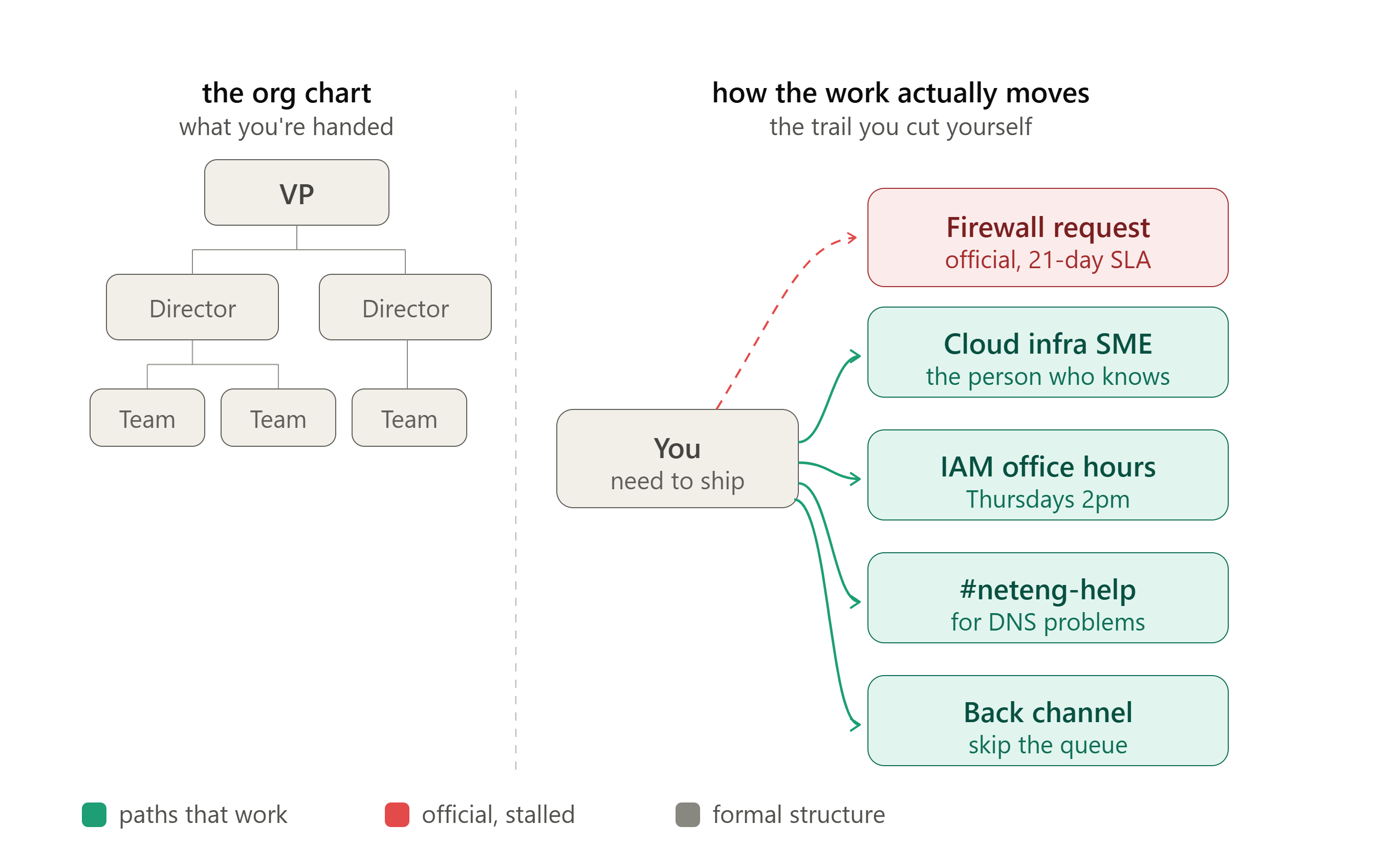
It has an org chart, which tells you nothing about how information and work actually flow through the enterprise. To be effective in a large organization, you need to know the right path to take to achieve a desired objective. If the work is local enough, such as implementing self-contained features for an application with well-defined boundaries, the path is straightforward. You just do the work as an individual contributor and verify it with the customer at the end of the release cycle. But if your work spans multiple products with loose boundaries, requires integrating and orchestrating multiple disparate services (both internal and third-party), and has pieces owned by different teams, then the path is not straightforward.
You need a map, a mental model, that captures the relationships, dependencies, and flow of information and decision making through various orgs: identity and access management, security, cloud platform management, networking, storage, data science, database administration, HR (e.g., when creating dedicated training modules), and specialized teams with domain area expertise. Even if you are on a flagship project that is well staffed, organized, and managed, you will undoubtedly run into unexpected situations and ambiguity. When that happens, will you know the right people to contact, the right team to engage, the right process to use to get unblocked and keep things moving forward? Or will you spin your wheels for days or weeks trying to navigate a maze and be stumped as to why, seemingly all of a sudden, things came to a screeching halt?
A meandering example
Here’s an (intentionally convoluted) example to help paint a picture of what can happen.
In earlier stages of my career, the map was not so apparent. When I first devised an idea for a chat-native HPC control plane, I didn’t know where to start. It took 6 months from inception to getting the first version in production. A lifetime compared to the three days it took me to set up a POC on a personal device and cloud subscription. So why did the internal version take so long?
It had nothing to do with the technical complexity of the solution. The main delays nearly all revolved around not knowing how to get access and approvals and who to engage. For example, getting the initial cloud infrastructure provisioned required submitting a request in an internal portal and waiting for another team to build it out. But when they did, I discovered they had provisioned things I did not need, and did not provision resources I did. In those days, there was nowhere in the request where one could specify what they wanted, and we did not yet have standard technical architecture diagrams (TADs) that could be auto-provisioned. I had to walk the cloud team through what they had to create and how they had to configure it.
There was only one problem. I did not have the access to see “under the hood” to know what was needed. My personal experiments were not on an enterprise cloud subscription, so the process I used for my POC was different and incompatible with what was required internally. Imagine you are asked by someone to draw a green line on a whiteboard. They hold the green marker in their hand. Can you draw the green line? You could ask the person for the marker, but what if they say no? I was not allowed access to certain resources and sections in the cloud, but without this access, I was flying blind as I had no way to guide them to what was needed. After much trial and error, we got things situated.
Then came the onslaught of other showstoppers. Traffic from Teams was not flowing to the bot. Everything was deployed and installed correctly in both the Teams client and the cloud back-end, but the logs were silent - not even errors. That led me to suspect the cause was with the application gateway traffic rules. After inspecting logs, I noticed requests were coming from two client IPs. Whitelisting those got traffic flowing! Except, not always. Most of the time it worked, but some messages did not get through. I engaged a Microsoft Bot Engineer and he could not identify a root cause. Setting things up on his end worked without a hitch. After carefully combing through logs and working with a handful of other internal teams who worked on similar chat-based apps, we found that there was a third client IP from which Teams requests could originate. These three IPs did not appear to be published anywhere; the Microsoft Bot Engineer was not aware of them and could not supply any Microsoft documentation. But they were essentially the Microsoft Bot Framework servers handling requests originating from Teams for our region.
Then there was integration with domain specific teams in the back-end. To get job telemetry and metadata, I had to tap into an existing legacy monolith. Since the cloud was new to us as an organization, I had to convince them that what I was doing was both needed and secure. If I were asking for something minor, approvals would likely be easier to secure. But I was asking to insert myself in front of every single simulation submitted in an org that dealt with millions of them per year. I had to understand the internal service, work with the team to understand the right place to insert the new logic, and secure approvals.
After getting through all this, I popped the champagne. After all this time, I had end-to-end integration, traffic was flowing, and the integration code was merged.
My excitement was short lived, as during their deployment, the back-end team ran into a production validation issue. I had written a script to check the response code of an HTTP call and ran it on a cluster to validate it. It worked fine and passed code review.
response=$(curl -s -w "%{http_code}" "$SERVICE_URL")

http_code=${response: -3}
body=${response:0:-3}

if [ "$http_code" != "200" ]; then
    echo "Request failed with status $http_code" >&2
    exit 1
fi
-w "%{http_code}" makes curl print the status code right after the response body, so response ends up as something like {"status":"ok"}200. I took the last three characters as the status code and everything before them as the body. I tested it thoroughly in HPC and it worked, but in production it failed. That’s because ${response:0:-3} uses a negative length, which bash only supports from version 4.2 or greater, and some nodes in the cluster had older versions that rejected it. This was undocumented configuration drift - the kind of obstacle you only discover by running into it.
So how do you create a map?
Most of the above was not documented anywhere - not in READMEs, request descriptions, or user guides. Many times I had to effectively feel my way to the other side in the dark. Other times I had to build rapport with folks on a team where I needed something and convince them to carve out time outside of designated office hours to dig in and help.
Building a map takes time and persistence and should capture both the path through the maze and any obstacles. Every bug and blocker should be documented along with the resolution, creating a historical record. What was the root cause? Who dug in and helped you on your journey? What was the solution? It’s also valuable to know who didn’t help you - which team was so overburdened that you didn’t get a reply for days or weeks, which person you contacted blew you off or simply sent you a weblink with no context, who answered your question with 5 questions of their own while ultimately giving you nothing to go on. The latter happens especially if people perceive you’re asking for permission or if they’re in a gatekeeping position and you’re asking them to let you through.
Know which doors are open and which are closed. Understand the various processes to engage different teams and their SLAs. Maintain good relationships throughout the organization so that when you come knocking, people are willing to answer. Keep an eye on emails announcing reorgs and leadership changes, and how that may impact what’s being worked on and how (e.g., you are on an on-prem infra team and your new VP’s experience is all Cloud-based). Attend the forums where you can gather valuable information - central tools teams’ office hours to see what other teams are doing, forums where important updates are presented, app owner sync events. Learn who the SMEs and decision makers are on critical teams for Identity and Access Management, cloud provisioning, network and firewall, and the like. It helps to write things down for reference; maintain an internal doc where you can remind yourself of what you encountered throughout the org’s landscape.
How do we navigate it effectively?
The whole point of the map is to reveal the path of least resistance to getting things done. A path through an at times impassable forest.
Let’s say you ask another team to help connect you with a vendor to find out if they can support a specialized solution; you just have some questions. You clearly explain in your request what you need, what you’ve tried, and why what you have is not sufficient. Instead of simply making the connection or giving you a name so you can ask your questions, you’re met with a barrage of inquiries. Why do you need this? What are you changing internally? Are you deviating from the agreed solution? What are you hoping to obtain from the vendor? The first one is hard to answer since you already pre-emptively supplied a response in the original request, so you may feel forced to awkwardly re-phrase the same thing. The last one is odd - you’re hoping the vendor will answer your questions, which is obvious, but you can’t just say that without the risk of misunderstanding.
The instinct here is to engage with the questions, to respond to the email with a “Please see my answers below.” You should suppress this instinct and avoid a direct response, which invites a potentially endless back-and-forth. As long as your leadership chain is in the know and supportive, just find a way around. Use enterprise search or past communications with the vendor to find contacts and ask your questions, sidestepping the internal inquisition. Only after doing this do you pick up the phone - not email - and call the team to close the loop. Avoid email here because we already have friction, and email adds more of it by being asynchronous, which works against our goals.
Sidestepping a barrier is not being rude, and the intent is not to ignore people. When you have something you need done, go do it. You do not need to slow down the pace to make sure every disparate team is on board. Contrary to popular belief, not everyone on every team needs to be on the same chapter and verse. Sometimes teams, orgs, or entire companies get stuck in a rut where they operate by committee, making sure “we are all on the same page.” People fear accusations of not being a team player. The reality is that most tasks do not require 100% alignment.
Conclusion
An enterprise of a significant size carries with it complexity and overhead in communications. Don’t get frustrated by this; build a map that goes beyond the basic org chart, which will help you better navigate the land to reach your destination. Without a map, you’re playing “Snakes and Ladders” where you’re at the mercy of chance - some roads will help you save a lot of time, while others may set you back weeks. With one, you have a rutter (pilot’s book of sailing directions) and can navigate dangerous waters without running aground.
The larger the company, the greater the overhead and the more compartmentalized things can get. Know which roads are clear to travel, and which are rough or blocked outright so you don’t burn cycles heading down those paths. When you encounter friction, resist the urge to debate or overexplain. Instead, consider if there’s an alternative that can sidestep the issue entirely.